

Python에서 데이터 분석을 위한 라이브러리 Pandas, Matplotlib, Numpy를 10분만에 익히는 방법
python에서 데이터 분석을 하기 위해서는 주로 사용하는 라이브러리가 있습니다. pandas, matplotlib, numpy입니다. 패키지들을 이용하는 이유는 데이터 분석을 용이하게 할 수 있도록, matrix연산과 시각화를 지원합니다. pandas는 DataFrame, Series의 데이터 객체를 이용해서 데이터를 쉽게 가공을 할 수 있습니다. 더나아가 평균, 분산, 최대, 최소 등을 쉽게 연산할 수 있습니다. 그 외에도 데이터 변수 사이에 연관성, 그룹, 선택, 조인 등의 다양한 함수를 통해 matrix를 효율적으로 쉽게 가공 할 수 있습니다. matplotlib은 데이터의 분포 및 패턴을 확인하기 위한 시각화 용도로 사용이 됩니다. 아래 예제를 통해 데이터 분석에 기본이 되는 함수를 익혀보도록 하겠습니다.
10 Minutes to pandas
In [273]:
import pandas as pd
import numpy as np
import matplotlib.pyplot as plt
Object Creation
In [274]:
s = pd.Series([1,3,5,np.nan,6,8])In [4]:
sOut[4]:
0    1.0
1    3.0
2    5.0
3    NaN
4    6.0
5    8.0
dtype: float64
In [5]:
# numpy array를 이용해 DataFrame 생성하기
dates = pd.date_range('20160620', periods=6)
dates
Out[5]:
DatetimeIndex(['2016-06-20', '2016-06-21', '2016-06-22', '2016-06-23',
               '2016-06-24', '2016-06-25'],
              dtype='datetime64[ns]', freq='D')
In [6]:
# 위에서 생성한 dates를 index로 생성하는 방법, (row x col)
df = pd.DataFrame(np.random.randn(6,4), index=dates, columns=list('ABCD'))
df
Out[6]:
| A | B | C | D | |
|---|---|---|---|---|
| 2016-06-20 | 0.109326 | 0.149287 | 0.308792 | 0.009975 |
| 2016-06-21 | 0.548566 | 2.039298 | -0.389184 | 0.310511 |
| 2016-06-22 | -0.025059 | 0.410800 | 1.193115 | -1.306679 |
| 2016-06-23 | -1.017573 | 0.257004 | 0.825450 | 2.935268 |
| 2016-06-24 | 0.894756 | -0.973764 | 0.100148 | 0.285566 |
| 2016-06-25 | 0.071252 | 0.696173 | 1.371591 | 0.332136 |
In [7]:
# dict의 형태를 DataFrame으로 생성하는 방법.
df2 = pd.DataFrame({ 'A' : 1.,
'B' : pd.Timestamp('20130102'),
'C' : pd.Series(1,index=list(range(4)),dtype='float32'),
'D' : np.array([3] * 4,dtype='int32'),
'E' : pd.Categorical(["test","train","test","train"]),
'F' : 'foo' })
df2
Out[7]:
| A | B | C | D | E | F | |
|---|---|---|---|---|---|---|
| 0 | 1.0 | 2013-01-02 | 1.0 | 3 | test | foo |
| 1 | 1.0 | 2013-01-02 | 1.0 | 3 | train | foo |
| 2 | 1.0 | 2013-01-02 | 1.0 | 3 | test | foo |
| 3 | 1.0 | 2013-01-02 | 1.0 | 3 | train | foo |
In [8]:
# DataFrame의 datatype확인하는 방법
df2.dtypes
Out[8]:
A float64 B datetime64[ns] C float32 D int32 E category F object dtype: object
In [9]:
# Viewing DataIn [10]:
# DataFrame의 top N을 보는 방법 df.head(N)
df.head()
Out[10]:
| A | B | C | D | |
|---|---|---|---|---|
| 2016-06-20 | 0.109326 | 0.149287 | 0.308792 | 0.009975 |
| 2016-06-21 | 0.548566 | 2.039298 | -0.389184 | 0.310511 |
| 2016-06-22 | -0.025059 | 0.410800 | 1.193115 | -1.306679 |
| 2016-06-23 | -1.017573 | 0.257004 | 0.825450 | 2.935268 |
| 2016-06-24 | 0.894756 | -0.973764 | 0.100148 | 0.285566 |
In [11]:
# DataFrame의 bottom N을 보는 방법 df.tail(N)
df.tail(3)
Out[11]:
| A | B | C | D | |
|---|---|---|---|---|
| 2016-06-23 | -1.017573 | 0.257004 | 0.825450 | 2.935268 |
| 2016-06-24 | 0.894756 | -0.973764 | 0.100148 | 0.285566 |
| 2016-06-25 | 0.071252 | 0.696173 | 1.371591 | 0.332136 |
In [12]:
df.indexOut[12]:
DatetimeIndex(['2016-06-20', '2016-06-21', '2016-06-22', '2016-06-23',
               '2016-06-24', '2016-06-25'],
              dtype='datetime64[ns]', freq='D')
In [13]:
df.columnsOut[13]:
Index([u'A', u'B', u'C', u'D'], dtype='object')In [23]:
df.valuesOut[23]:
array([[-0.55438059,  0.41257123,  0.13468592, -0.30762167],
       [ 0.52580499, -0.35814994,  1.2923575 ,  1.12533021],
       [-0.73907553, -0.12261106, -0.15062314, -0.61562674],
       [ 1.02592656, -0.77207127, -0.45549946, -0.93190737],
       [ 0.59770076,  0.06347513, -1.00554327,  0.98352547],
       [-0.21020512, -1.26250553,  0.39272935,  0.60436413]])
In [24]:
df.describe()Out[24]:
| A | B | C | D | |
|---|---|---|---|---|
| count | 6.000000 | 6.000000 | 6.000000 | 6.000000 |
| mean | 0.107629 | -0.339882 | 0.034684 | 0.143011 |
| std | 0.709154 | 0.602403 | 0.784427 | 0.873878 |
| min | -0.739076 | -1.262506 | -1.005543 | -0.931907 |
| 25% | -0.468337 | -0.668591 | -0.379280 | -0.538625 |
| 50% | 0.157800 | -0.240380 | -0.007969 | 0.148371 |
| 75% | 0.579727 | 0.016954 | 0.328218 | 0.888735 |
| max | 1.025927 | 0.412571 | 1.292358 | 1.125330 |
In [25]:
# transposing
df.T
Out[25]:
| 2016-06-20 00:00:00 | 2016-06-21 00:00:00 | 2016-06-22 00:00:00 | 2016-06-23 00:00:00 | 2016-06-24 00:00:00 | 2016-06-25 00:00:00 | |
|---|---|---|---|---|---|---|
| A | -0.554381 | 0.525805 | -0.739076 | 1.025927 | 0.597701 | -0.210205 |
| B | 0.412571 | -0.358150 | -0.122611 | -0.772071 | 0.063475 | -1.262506 |
| C | 0.134686 | 1.292358 | -0.150623 | -0.455499 | -1.005543 | 0.392729 |
| D | -0.307622 | 1.125330 | -0.615627 | -0.931907 | 0.983525 | 0.604364 |
In [36]:
# axis의 개념은 (0,0)을 기준으로 0=down, 1=across를 의미한다. 풀어 말하면
# axis=0은 각 apply a method down each column,row의 labels를 나타낸다 (index)
# axis=1은 각 apply a method across each row, column labels
df.sort_index(axis=1, ascending=False) # column의 값으로 정렬
Out[36]:
| D | C | B | A | |
|---|---|---|---|---|
| 2016-06-20 | -0.307622 | 0.134686 | 0.412571 | -0.554381 |
| 2016-06-21 | 1.125330 | 1.292358 | -0.358150 | 0.525805 |
| 2016-06-22 | -0.615627 | -0.150623 | -0.122611 | -0.739076 |
| 2016-06-23 | -0.931907 | -0.455499 | -0.772071 | 1.025927 |
| 2016-06-24 | 0.983525 | -1.005543 | 0.063475 | 0.597701 |
| 2016-06-25 | 0.604364 | 0.392729 | -1.262506 | -0.210205 |
In [ ]:
df.sort_index(axis=0, ascending=False) # row의 값으로 정렬In [29]:
df.sort_values(by='B')Out[29]:
| A | B | C | D | |
|---|---|---|---|---|
| 2016-06-25 | -0.210205 | -1.262506 | 0.392729 | 0.604364 |
| 2016-06-23 | 1.025927 | -0.772071 | -0.455499 | -0.931907 |
| 2016-06-21 | 0.525805 | -0.358150 | 1.292358 | 1.125330 |
| 2016-06-22 | -0.739076 | -0.122611 | -0.150623 | -0.615627 |
| 2016-06-24 | 0.597701 | 0.063475 | -1.005543 | 0.983525 |
| 2016-06-20 | -0.554381 | 0.412571 | 0.134686 | -0.307622 |
Selection
Getting
In [38]:
# getting
df['A']
Out[38]:
2016-06-20   -0.554381
2016-06-21    0.525805
2016-06-22   -0.739076
2016-06-23    1.025927
2016-06-24    0.597701
2016-06-25   -0.210205
Freq: D, Name: A, dtype: float64
In [39]:
df[1:3]Out[39]:
| A | B | C | D | |
|---|---|---|---|---|
| 2016-06-20 | -0.554381 | 0.412571 | 0.134686 | -0.307622 |
| 2016-06-21 | 0.525805 | -0.358150 | 1.292358 | 1.125330 |
| 2016-06-22 | -0.739076 | -0.122611 | -0.150623 | -0.615627 |
Selection by label
In [41]:
# selection by label
df.loc[dates[0]]
Out[41]:
A   -0.554381
B    0.412571
C    0.134686
D   -0.307622
Name: 2016-06-20 00:00:00, dtype: float64
In [44]:
# : 는 row의 전체 범위를 의미한다.전체의 row에서 ['A','B'] column을 선택
df.loc[:,['A','B']]
Out[44]:
| A | B | |
|---|---|---|
| 2016-06-20 | -0.554381 | 0.412571 |
| 2016-06-21 | 0.525805 | -0.358150 |
| 2016-06-22 | -0.739076 | -0.122611 |
| 2016-06-23 | 1.025927 | -0.772071 |
| 2016-06-24 | 0.597701 | 0.063475 |
| 2016-06-25 | -0.210205 | -1.262506 |
In [55]:
# '20160620':'20160623 까지의 날짜를 기간으로 입력하고, ['A','B']의 column을 선택
df.loc['20160620':'20160623',['A','B']]
Out[55]:
| A | B | |
|---|---|---|
| 2016-06-20 | -0.554381 | 0.412571 |
| 2016-06-21 | 0.525805 | -0.358150 |
| 2016-06-22 | -0.739076 | -0.122611 |
| 2016-06-23 | 1.025927 | -0.772071 |
In [61]:
# 20160621의 이전의 row를 선택
df.loc[:'20160621']
Out[61]:
| A | B | C | D | |
|---|---|---|---|---|
| 2016-06-20 | -0.554381 | 0.412571 | 0.134686 | -0.307622 |
| 2016-06-21 | 0.525805 | -0.358150 | 1.292358 | 1.125330 |
In [60]:
df.loc['20160620',['A','B']]Out[60]:
A   -0.554381
B    0.412571
Name: 2016-06-20 00:00:00, dtype: float64
In [62]:
# dates[0]에 column'A'를 선택
df.loc[dates[0], 'A']
Out[62]:
-0.55438058642296195In [63]:
df.at[dates[0],'A']Out[63]:
-0.55438058642296195selection by position
In [69]:
# N번째 row를 가져오는 방법 index의 location을 바로
df.iloc[3]
Out[69]:
A    1.025927
B   -0.772071
C   -0.455499
D   -0.931907
Name: 2016-06-23 00:00:00, dtype: float64
In [75]:
# 3번째 ~ 5번째까지의 row를 가져오고 2부터 (4-1)의 column을 선택
df.iloc[3:5,2:4]
Out[75]:
| C | D | |
|---|---|---|
| 2016-06-23 | -0.455499 | -0.931907 |
| 2016-06-24 | -1.005543 | 0.983525 |
In [76]:
# 1,2,4row와 0,2의 column을 선택
df.iloc[[1,2,4],[0,2]]
Out[76]:
| A | C | |
|---|---|---|
| 2016-06-21 | 0.525805 | 1.292358 |
| 2016-06-22 | -0.739076 | -0.150623 |
| 2016-06-24 | 0.597701 | -1.005543 |
In [78]:
# row 1:3, column 전체
df.iloc[1:3,:]
Out[78]:
| A | B | C | D | |
|---|---|---|---|---|
| 2016-06-21 | 0.525805 | -0.358150 | 1.292358 | 1.125330 |
| 2016-06-22 | -0.739076 | -0.122611 | -0.150623 | -0.615627 |
In [79]:
# row 전체, column 1:3
df.iloc[:, 1:3]
Out[79]:
| B | C | |
|---|---|---|
| 2016-06-20 | 0.412571 | 0.134686 |
| 2016-06-21 | -0.358150 | 1.292358 |
| 2016-06-22 | -0.122611 | -0.150623 |
| 2016-06-23 | -0.772071 | -0.455499 |
| 2016-06-24 | 0.063475 | -1.005543 |
| 2016-06-25 | -1.262506 | 0.392729 |
In [80]:
df.iloc[1,1]Out[80]:
-0.35814994083359336In [81]:
df.iat[1,1]Out[81]:
-0.35814994083359336Boolean Indexing
In [83]:
df[df.A > 0]Out[83]:
| A | B | C | D | |
|---|---|---|---|---|
| 2016-06-21 | 0.525805 | -0.358150 | 1.292358 | 1.125330 |
| 2016-06-23 | 1.025927 | -0.772071 | -0.455499 | -0.931907 |
| 2016-06-24 | 0.597701 | 0.063475 | -1.005543 | 0.983525 |
In [84]:
df[df > 0]Out[84]:
| A | B | C | D | |
|---|---|---|---|---|
| 2016-06-20 | NaN | 0.412571 | 0.134686 | NaN |
| 2016-06-21 | 0.525805 | NaN | 1.292358 | 1.125330 |
| 2016-06-22 | NaN | NaN | NaN | NaN |
| 2016-06-23 | 1.025927 | NaN | NaN | NaN |
| 2016-06-24 | 0.597701 | 0.063475 | NaN | 0.983525 |
| 2016-06-25 | NaN | NaN | 0.392729 | 0.604364 |
In [85]:
df > 0Out[85]:
| A | B | C | D | |
|---|---|---|---|---|
| 2016-06-20 | False | True | True | False |
| 2016-06-21 | True | False | True | True |
| 2016-06-22 | False | False | False | False |
| 2016-06-23 | True | False | False | False |
| 2016-06-24 | True | True | False | True |
| 2016-06-25 | False | False | True | True |
In [87]:
df2 = df.copy()
df2['E'] = ['one','one','two','three','four','three']
df2
Out[87]:
| A | B | C | D | E | |
|---|---|---|---|---|---|
| 2016-06-20 | -0.554381 | 0.412571 | 0.134686 | -0.307622 | one |
| 2016-06-21 | 0.525805 | -0.358150 | 1.292358 | 1.125330 | one |
| 2016-06-22 | -0.739076 | -0.122611 | -0.150623 | -0.615627 | two |
| 2016-06-23 | 1.025927 | -0.772071 | -0.455499 | -0.931907 | three |
| 2016-06-24 | 0.597701 | 0.063475 | -1.005543 | 0.983525 | four |
| 2016-06-25 | -0.210205 | -1.262506 | 0.392729 | 0.604364 | three |
In [93]:
df2['E'].isin(['two','four'])Out[93]:
2016-06-20    False
2016-06-21    False
2016-06-22     True
2016-06-23    False
2016-06-24     True
2016-06-25    False
Freq: D, Name: E, dtype: bool
In [92]:
df2[df2['E'].isin(['two','four'])]Out[92]:
| A | B | C | D | E | |
|---|---|---|---|---|---|
| 2016-06-22 | -0.739076 | -0.122611 | -0.150623 | -0.615627 | two |
| 2016-06-24 | 0.597701 | 0.063475 | -1.005543 | 0.983525 | four |
Setting
In [39]:
s1 = pd.Series([1,2,3,4,5,6], index=pd.date_range('20160620', periods=6))
s1
Out[39]:
2016-06-20    1
2016-06-21    2
2016-06-22    3
2016-06-23    4
2016-06-24    5
2016-06-25    6
Freq: D, dtype: int64
In [40]:
df['F'] = s1In [41]:
df.at[dates[0], 'A'] = 0In [42]:
df.iat[0,1] = 0In [43]:
# numpy array를 set
df.loc[:,'D'] = np.array([5] * len(df))
In [44]:
dfOut[44]:
| A | B | C | D | F | |
|---|---|---|---|---|---|
| 2016-06-20 | 0.000000 | 0.000000 | 0.308792 | 5 | 1 |
| 2016-06-21 | 0.548566 | 2.039298 | -0.389184 | 5 | 2 |
| 2016-06-22 | -0.025059 | 0.410800 | 1.193115 | 5 | 3 |
| 2016-06-23 | -1.017573 | 0.257004 | 0.825450 | 5 | 4 |
| 2016-06-24 | 0.894756 | -0.973764 | 0.100148 | 5 | 5 |
| 2016-06-25 | 0.071252 | 0.696173 | 1.371591 | 5 | 6 |
In [47]:
# where operation
df2 = df.copy()
df2[df2 > 0] = -df2
df2
Out[47]:
| A | B | C | D | F | |
|---|---|---|---|---|---|
| 2016-06-20 | 0.000000 | 0.000000 | -0.308792 | -5 | -1 |
| 2016-06-21 | -0.548566 | -2.039298 | -0.389184 | -5 | -2 |
| 2016-06-22 | -0.025059 | -0.410800 | -1.193115 | -5 | -3 |
| 2016-06-23 | -1.017573 | -0.257004 | -0.825450 | -5 | -4 |
| 2016-06-24 | -0.894756 | -0.973764 | -0.100148 | -5 | -5 |
| 2016-06-25 | -0.071252 | -0.696173 | -1.371591 | -5 | -6 |
Missing Data
In [49]:
df1 = df.reindex(index=dates[0:4], columns=list(df.columns) + ['E'])
df1.loc[dates[0]:dates[1], 'E'] = 1
df1
Out[49]:
| A | B | C | D | F | E | |
|---|---|---|---|---|---|---|
| 2016-06-20 | 0.000000 | 0.000000 | 0.308792 | 5 | 1 | 1.0 |
| 2016-06-21 | 0.548566 | 2.039298 | -0.389184 | 5 | 2 | 1.0 |
| 2016-06-22 | -0.025059 | 0.410800 | 1.193115 | 5 | 3 | NaN |
| 2016-06-23 | -1.017573 | 0.257004 | 0.825450 | 5 | 4 | NaN |
In [51]:
df1.dropna(how='any')Out[51]:
| A | B | C | D | F | E | |
|---|---|---|---|---|---|---|
| 2016-06-20 | 0.000000 | 0.000000 | 0.308792 | 5 | 1 | 1.0 |
| 2016-06-21 | 0.548566 | 2.039298 | -0.389184 | 5 | 2 | 1.0 |
In [53]:
df1.fillna(value=5)Out[53]:
| A | B | C | D | F | E | |
|---|---|---|---|---|---|---|
| 2016-06-20 | 0.000000 | 0.000000 | 0.308792 | 5 | 1 | 1.0 |
| 2016-06-21 | 0.548566 | 2.039298 | -0.389184 | 5 | 2 | 1.0 |
| 2016-06-22 | -0.025059 | 0.410800 | 1.193115 | 5 | 3 | 5.0 |
| 2016-06-23 | -1.017573 | 0.257004 | 0.825450 | 5 | 4 | 5.0 |
In [54]:
df1.fillna(value=5)Out[54]:
| A | B | C | D | F | E | |
|---|---|---|---|---|---|---|
| 2016-06-20 | 0.000000 | 0.000000 | 0.308792 | 5 | 1 | 1.0 |
| 2016-06-21 | 0.548566 | 2.039298 | -0.389184 | 5 | 2 | 1.0 |
| 2016-06-22 | -0.025059 | 0.410800 | 1.193115 | 5 | 3 | 5.0 |
| 2016-06-23 | -1.017573 | 0.257004 | 0.825450 | 5 | 4 | 5.0 |
Operations
In [66]:
df.mean(0)Out[66]:
A    0.078657
B    0.404918
C    0.568319
D    5.000000
F    3.500000
dtype: float64
In [61]:
df.mean(1)Out[61]:
2016-06-20    1.261758
2016-06-21    1.839736
2016-06-22    1.915771
2016-06-23    1.812976
2016-06-24    2.004228
2016-06-25    2.627803
Freq: D, dtype: float64
In [58]:
s = pd.Series([1,3,5,np.nan,6,8], index=dates).shift(2)
s
Out[58]:
2016-06-20    NaN
2016-06-21    NaN
2016-06-22    1.0
2016-06-23    3.0
2016-06-24    5.0
2016-06-25    NaN
Freq: D, dtype: float64
In [67]:
df.sub(s, axis='index')Out[67]:
| A | B | C | D | F | |
|---|---|---|---|---|---|
| 2016-06-20 | NaN | NaN | NaN | NaN | NaN |
| 2016-06-21 | NaN | NaN | NaN | NaN | NaN |
| 2016-06-22 | -1.025059 | -0.589200 | 0.193115 | 4.0 | 2.0 |
| 2016-06-23 | -4.017573 | -2.742996 | -2.174550 | 2.0 | 1.0 |
| 2016-06-24 | -4.105244 | -5.973764 | -4.899852 | 0.0 | 0.0 |
| 2016-06-25 | NaN | NaN | NaN | NaN | NaN |
In [70]:
df.apply(np.cumsum)Out[70]:
| A | B | C | D | F | |
|---|---|---|---|---|---|
| 2016-06-20 | 0.000000 | 0.000000 | 0.308792 | 5 | 1 |
| 2016-06-21 | 0.548566 | 2.039298 | -0.080393 | 10 | 3 |
| 2016-06-22 | 0.523507 | 2.450098 | 1.112722 | 15 | 6 |
| 2016-06-23 | -0.494066 | 2.707102 | 1.938172 | 20 | 10 |
| 2016-06-24 | 0.400690 | 1.733337 | 2.038320 | 25 | 15 |
| 2016-06-25 | 0.471941 | 2.429511 | 3.409912 | 30 | 21 |
In [72]:
df.apply(lambda x: x.max() - x.min())Out[72]:
A    1.912329
B    3.013062
C    1.760776
D    0.000000
F    5.000000
dtype: float64
In [74]:
s = pd.Series(np.random.randint(0, 7, size=10))
s
Out[74]:
0    6
1    3
2    3
3    3
4    3
5    6
6    0
7    6
8    6
9    4
dtype: int64
In [76]:
s.value_counts()Out[76]:
6    4
3    4
4    1
0    1
dtype: int64
In [78]:
s = pd.Series(['A', 'B', 'C', 'Aaba', 'Baca', np.nan, 'CABA', 'dog', 'cat'])
s.str.lower()
Out[78]:
0       a
1       b
2       c
3    aaba
4    baca
5     NaN
6    caba
7     dog
8     cat
dtype: object
Merge
In [81]:
df = pd.DataFrame(np.random.randn(10, 4))
df
Out[81]:
| 0 | 1 | 2 | 3 | |
|---|---|---|---|---|
| 0 | -0.388622 | -0.005810 | -0.908106 | 0.484967 |
| 1 | -0.009531 | 0.822985 | -1.253726 | 0.124277 |
| 2 | 0.204007 | 1.143845 | 0.008254 | 0.232695 |
| 3 | -0.172336 | -0.696542 | 0.949102 | -0.482695 |
| 4 | -0.356362 | -0.210155 | 2.374065 | 0.685619 |
| 5 | 1.501421 | 0.641777 | 0.486696 | -0.615906 |
| 6 | 1.361051 | 0.942860 | -1.012667 | 0.284850 |
| 7 | 1.013987 | 1.627106 | -0.803233 | -0.017787 |
| 8 | 1.023373 | -0.908090 | 0.153074 | -0.028403 |
| 9 | 0.115687 | 1.477403 | 0.970383 | -0.726197 |
In [87]:
# Row를 나누는 작업임 0~2 의 rows, 3~6의 rows, 7~9의 rows
pieces = [df[:3], df[3:7], df[7:]]
# pieces[0] 0~2의 rows를 출력
#pieces
# 나뉘어진 pices를 붙이기 위해서 pd.concat()
pd.concat(pieces)
Out[87]:
| 0 | 1 | 2 | 3 | |
|---|---|---|---|---|
| 0 | -0.388622 | -0.005810 | -0.908106 | 0.484967 |
| 1 | -0.009531 | 0.822985 | -1.253726 | 0.124277 |
| 2 | 0.204007 | 1.143845 | 0.008254 | 0.232695 |
| 3 | -0.172336 | -0.696542 | 0.949102 | -0.482695 |
| 4 | -0.356362 | -0.210155 | 2.374065 | 0.685619 |
| 5 | 1.501421 | 0.641777 | 0.486696 | -0.615906 |
| 6 | 1.361051 | 0.942860 | -1.012667 | 0.284850 |
| 7 | 1.013987 | 1.627106 | -0.803233 | -0.017787 |
| 8 | 1.023373 | -0.908090 | 0.153074 | -0.028403 |
| 9 | 0.115687 | 1.477403 | 0.970383 | -0.726197 |
In [91]:
# Join
left = pd.DataFrame({'key': ['foo', 'foo'], 'lval': [1, 2]})
left
Out[91]:
| key | lval | |
|---|---|---|
| 0 | foo | 1 |
| 1 | foo | 2 |
In [93]:
right = pd.DataFrame({'key': ['foo', 'foo'], 'rval': [4, 5]})
right
Out[93]:
| key | rval | |
|---|---|---|
| 0 | foo | 4 |
| 1 | foo | 5 |
In [96]:
pd.merge(left, right, on='key')Out[96]:
| key | lval | rval | |
|---|---|---|---|
| 0 | foo | 1 | 4 |
| 1 | foo | 1 | 5 |
| 2 | foo | 2 | 4 |
| 3 | foo | 2 | 5 |
In [98]:
df = pd.DataFrame(np.random.randn(8, 4), columns=['A','B','C','D'])
df
Out[98]:
| A | B | C | D | |
|---|---|---|---|---|
| 0 | -0.750785 | -0.982225 | -0.192320 | -1.018909 |
| 1 | -0.467425 | 1.396932 | -0.292926 | 0.866792 |
| 2 | 1.782684 | -0.309392 | -0.826318 | 1.455472 |
| 3 | 0.259205 | 0.160377 | -3.473742 | 0.928269 |
| 4 | -1.016813 | -1.737516 | 0.362811 | -0.861144 |
| 5 | 1.145282 | -0.242865 | 0.593853 | -0.099659 |
| 6 | -0.811005 | 0.753154 | 1.560544 | 0.409978 |
| 7 | -1.687995 | 1.007088 | 0.619152 | 0.191609 |
In [100]:
s = df.iloc[3]
df.append(s, ignore_index=True)
Out[100]:
| A | B | C | D | |
|---|---|---|---|---|
| 0 | -0.750785 | -0.982225 | -0.192320 | -1.018909 |
| 1 | -0.467425 | 1.396932 | -0.292926 | 0.866792 |
| 2 | 1.782684 | -0.309392 | -0.826318 | 1.455472 |
| 3 | 0.259205 | 0.160377 | -3.473742 | 0.928269 |
| 4 | -1.016813 | -1.737516 | 0.362811 | -0.861144 |
| 5 | 1.145282 | -0.242865 | 0.593853 | -0.099659 |
| 6 | -0.811005 | 0.753154 | 1.560544 | 0.409978 |
| 7 | -1.687995 | 1.007088 | 0.619152 | 0.191609 |
| 8 | 0.259205 | 0.160377 | -3.473742 | 0.928269 |
Grouping
In [104]:
df = pd.DataFrame({'A':['foo','bar','foo','bar','foo','bar','foo','foo'],
                  'B':['one','one','two','three','two','two','one','three'],
                  'C':np.random.randn(8),
                   'D':np.random.randn(8)})
df
Out[104]:
| A | B | C | D | |
|---|---|---|---|---|
| 0 | foo | one | -0.706122 | -0.329989 |
| 1 | bar | one | 1.657071 | -0.407027 |
| 2 | foo | two | -0.043819 | 1.957187 |
| 3 | bar | three | 0.470587 | -0.145247 |
| 4 | foo | two | -2.206332 | 0.652766 |
| 5 | bar | two | 0.672978 | -1.534902 |
| 6 | foo | one | -1.513980 | -1.805170 |
| 7 | foo | three | -0.026595 | -0.623450 |
In [106]:
# A Column을 group해서 합을 더한 값 C,D
df.groupby('A').sum()
Out[106]:
| C | D | |
|---|---|---|
| A | ||
| bar | 2.800637 | -2.087176 |
| foo | -4.496849 | -0.148656 |
In [108]:
df.groupby(['A','B']).sum()Out[108]:
| C | D | ||
|---|---|---|---|
| A | B | ||
| bar | one | 1.657071 | -0.407027 |
| three | 0.470587 | -0.145247 | |
| two | 0.672978 | -1.534902 | |
| foo | one | -2.220103 | -2.135158 |
| three | -0.026595 | -0.623450 | |
| two | -2.250151 | 2.609953 |
Reshaping
In [136]:
# zip은 김밥을 생각하면 되는데 당근, 햄 넣고 두개를 동시에 자른다고 생각하면됩니다.
# 리스트를 두개 넣으면 각 리스트에서 한개씩 값을 가져와서 tuple로 생성합니다.
# zip(*[['a','b','c'],['d','e','f']])
# [('a', 'd'), ('b', 'e'), ('c', 'f')]
tuples = list(zip(*[['bar', 'bar', 'baz', 'baz', 'foo', 'foo', 'qux', 'qux'],
                  ['one', 'two', 'one', 'two', 'one', 'two', 'one', 'two']]))
# print tuples
# [('bar', 'one'), ('bar', 'two'), ('baz', 'one'), ('baz', 'two'), ('foo', 'one'), ('foo', 'two'), ('qux', 'one'), ('qux', 'two')]
# ('bar', 'one')의 tupler값을 multiindex로 생성하는 방법
index = pd.MultiIndex.from_tuples(tuples, names=['first','second'])
print index
df = pd.DataFrame(np.random.randn(8,2), index=index, columns=['A', 'B'])
print df
df2 = df[:4]
print df2
MultiIndex(levels=[[u'bar', u'baz', u'foo', u'qux'], [u'one', u'two']],
           labels=[[0, 0, 1, 1, 2, 2, 3, 3], [0, 1, 0, 1, 0, 1, 0, 1]],
           names=[u'first', u'second'])
                     A         B
first second
bar   one     0.953384 -0.269832
      two     2.046435  0.074582
baz   one    -0.989456  0.792145
      two    -1.863672  0.381369
foo   one     1.369745  0.635478
      two    -0.726009 -0.557414
qux   one    -1.680548  1.363867
      two    -0.554227 -0.011822
                     A         B
first second
bar   one     0.953384 -0.269832
      two     2.046435  0.074582
baz   one    -0.989456  0.792145
      two    -1.863672  0.381369
In [139]:
stacked = df2.stack()
print stacked
print type(stacked)
print len(stacked)
print stacked[0]
first second
bar one A 0.953384
B -0.269832
two A 2.046435
B 0.074582
baz one A -0.989456
B 0.792145
two A -1.863672
B 0.381369
dtype: float64
<class 'pandas.core.series.Series'>
8
0.953383981031In [126]:
stacked.unstack()Out[126]:
| A | B | ||
|---|---|---|---|
| first | second | ||
| bar | one | -0.686062 | -0.933043 |
| two | -1.853792 | 1.926521 | |
| baz | one | -1.638858 | 0.366370 |
| two | 0.287980 | -1.675488 |
In [128]:
stacked.unstack(1)Out[128]:
| second | one | two | |
|---|---|---|---|
| first | |||
| bar | A | -0.686062 | -1.853792 |
| B | -0.933043 | 1.926521 | |
| baz | A | -1.638858 | 0.287980 |
| B | 0.366370 | -1.675488 |
In [140]:
stacked.unstack(0)Out[140]:
| first | bar | baz | |
|---|---|---|---|
| second | |||
| one | A | 0.953384 | -0.989456 |
| B | -0.269832 | 0.792145 | |
| two | A | 2.046435 | -1.863672 |
| B | 0.074582 | 0.381369 |
Pivot Tables
In [142]:
df = pd.DataFrame({'A' : ['one', 'one', 'two', 'three'] * 3,
                   'B' : ['A', 'B', 'C'] * 4,
                   'C' : ['foo', 'foo', 'foo', 'bar', 'bar', 'bar'] * 2,
                   'D' : np.random.randn(12),'E' : np.random.randn(12)})
print df
A B C D E
0 one A foo 0.266995 2.207506
1 one B foo -0.027444 0.257355
2 two C foo -1.775254 0.407818
3 three A bar -0.697476 -0.274161
4 one B bar 1.502007 0.278767
5 one C bar -2.535791 -0.203028
6 two A foo 0.772634 -2.020433
7 three B foo 1.313859 0.289895
8 one C foo 0.411518 -0.121833
9 one A bar 1.975446 -0.313777
10 two B bar 0.498896 -0.615964
11 three C bar 0.962692 -1.151602
In [162]:
# pivot table을 만들기 위해서 values로 사용할 값, index, columns을 넣어주면 된다.
# C를 만약에 column으로 사용한다면, C의 값들의 set이 column으로 사용이 된다.
# A, B를 index로 사용하면 row의 index로 사용이 된다.
pivot = pd.pivot_table(df, values=['D','E'], index=['A','B'], columns=['C'])
print pivot

# pivot에서 값을 접근하는 방법은 아래와 같음
print pivot['D']['bar']['one']['A']
                D                   E
C             bar       foo       bar       foo
A     B
one   A  1.975446  0.266995 -0.313777  2.207506
      B  1.502007 -0.027444  0.278767  0.257355
      C -2.535791  0.411518 -0.203028 -0.121833
three A -0.697476       NaN -0.274161       NaN
      B       NaN  1.313859       NaN  0.289895
      C  0.962692       NaN -1.151602       NaN
two   A       NaN  0.772634       NaN -2.020433
      B  0.498896       NaN -0.615964       NaN
      C       NaN -1.775254       NaN  0.407818
1.97544617552
Time Series
In [181]:
# 2012년 1월 1일 0시 0분 0초 부터 시작해서 100개를 생성하는데, freq는 초를 단위로 해서 생성
rng = pd.date_range('1/1/2012', periods=100, freq='S')
ts = pd.Series(np.random.randint(0, 500, len(rng)), index=rng)
# 5분단위로 계산
ts.resample('5Min').sum()
Out[181]:
2012-01-01    26864
Freq: 5T, dtype: int64
In [186]:
# 하루를 기준으로 2012년 3월 6일부터 5개를
rng = pd.date_range('3/6/2012 00:00', periods=5, freq='D')
print rng
ts = pd.Series(np.random.randn(len(rng)), rng)
print ts
DatetimeIndex(['2012-03-06', '2012-03-07', '2012-03-08', '2012-03-09',
'2012-03-10'],
dtype='datetime64[ns]', freq='D')
2012-03-06 1.558119
2012-03-07 0.912712
2012-03-08 0.386135
2012-03-09 -1.332147
2012-03-10 -0.212428
Freq: D, dtype: float64
In [187]:
# time zone을 표시하거나 변경하는 방법
ts_utc = ts.tz_localize('UTC')
ts_utc.tz_convert('US/Eastern')
Out[187]:
2012-03-05 19:00:00-05:00    1.558119
2012-03-06 19:00:00-05:00    0.912712
2012-03-07 19:00:00-05:00    0.386135
2012-03-08 19:00:00-05:00   -1.332147
2012-03-09 19:00:00-05:00   -0.212428
Freq: D, dtype: float64
In [188]:
rng = pd.date_range('1/1/2012', periods=5, freq='M')
ts = pd.Series(np.random.randn(len(rng)), index=rng)
print ts
ps = ts.to_period()
print ps
ps.to_timestamp()
2012-01-31 0.948764
2012-02-29 -0.779314
2012-03-31 0.143111
2012-04-30 -0.152510
2012-05-31 0.304613
Freq: M, dtype: float64
2012-01 0.948764
2012-02 -0.779314
2012-03 0.143111
2012-04 -0.152510
2012-05 0.304613
Freq: M, dtype: float64Out[188]:
2012-01-01    0.948764
2012-02-01   -0.779314
2012-03-01    0.143111
2012-04-01   -0.152510
2012-05-01    0.304613
Freq: MS, dtype: float64
In [192]:
# Quarterly frequency
prng = pd.period_range('1990Q1', '2000Q4', freq='Q-NOV')
print prng
ts = pd.Series(np.random.randn(len(prng)), prng)
ts.index = (prng.asfreq('M', 'e') + 1).asfreq('H', 's') + 9
ts.head()
PeriodIndex(['1990Q1', '1990Q2', '1990Q3', '1990Q4', '1991Q1', '1991Q2',
'1991Q3', '1991Q4', '1992Q1', '1992Q2', '1992Q3', '1992Q4',
'1993Q1', '1993Q2', '1993Q3', '1993Q4', '1994Q1', '1994Q2',
'1994Q3', '1994Q4', '1995Q1', '1995Q2', '1995Q3', '1995Q4',
'1996Q1', '1996Q2', '1996Q3', '1996Q4', '1997Q1', '1997Q2',
'1997Q3', '1997Q4', '1998Q1', '1998Q2', '1998Q3', '1998Q4',
'1999Q1', '1999Q2', '1999Q3', '1999Q4', '2000Q1', '2000Q2',
'2000Q3', '2000Q4'],
dtype='int64', freq='Q-NOV')Out[192]:
1990-03-01 09:00    0.905044
1990-06-01 09:00   -0.215269
1990-09-01 09:00    1.373032
1990-12-01 09:00    0.833878
1991-03-01 09:00    0.675017
Freq: H, dtype: float64
Categoricals
In [213]:
# id, raw_grade를 columns으로 가지고 있는 테이블 생성
df = pd.DataFrame({"id":[1,2,3,4,5,6], "raw_grade":['a', 'b', 'b', 'a', 'a', 'e']})
df
Out[213]:
| id | raw_grade | |
|---|---|---|
| 0 | 1 | a |
| 1 | 2 | b |
| 2 | 3 | b |
| 3 | 4 | a |
| 4 | 5 | a |
| 5 | 6 | e |
In [217]:
df['grade'] = df['raw_grade'].astype('category')
print df['grade']
0 a
1 b
2 b
3 a
4 a
5 e
Name: grade, dtype: category
Categories (3, object): [a, b, e]In [218]:
# grade의 값을  Series.cat.categories를 사용해서 의미이는 이름으로 변경하는 방법
df['grade'].cat.categories=['very good', 'good','very bad']
df
Out[218]:
| id | raw_grade | grade | |
|---|---|---|---|
| 0 | 1 | a | very good |
| 1 | 2 | b | good |
| 2 | 3 | b | good |
| 3 | 4 | a | very good |
| 4 | 5 | a | very good |
| 5 | 6 | e | very bad |
In [219]:
# 위에서 cat.categories는 length가 다르면 에러가 발생, 아래 set_categories는 categories를 추가.
# 만약 set_categories의 값이 기존에 없으면 NaN이 들어간다.
df["grade"] = df["grade"].cat.set_categories(["very bad", "bad", "medium", "good", "very good"])
print df['grade']
0 very good
1 good
2 good
3 very good
4 very good
5 very bad
Name: grade, dtype: category
Categories (5, object): [very bad, bad, medium, good, very good]In [210]:
df.sort_values(by="grade")Out[210]:
| id | raw_grade | grade | |
|---|---|---|---|
| 5 | 6 | e | very bad |
| 1 | 2 | b | good |
| 2 | 3 | b | good |
| 0 | 1 | a | very good |
| 3 | 4 | a | very good |
| 4 | 5 | a | very good |
In [212]:
# Category별로 몇개의 값이 있는지 확인
df.groupby("grade").size()
Out[212]:
grade
very bad     1
bad          0
medium       0
good         2
very good    3
dtype: int64
Plotting
In [232]:
%matplotlib inline
# pd.date_range를 이용해 2000년1월1일~ 1000개를 생성

ts = pd.Series(np.random.randn(1000), index=pd.date_range('1/1/2000', periods=1000))
ts = ts.cumsum()
try:
    ts.plot()
except Exception:
    pass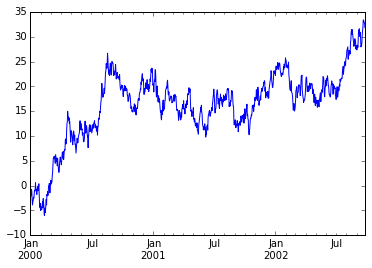
Data In/Out
In [258]:
# CSV 쓰는 방법
df.to_csv('foo.csv')
In [262]:
# CSV 읽는 방법
pd.read_csv('foo.csv').head()
Out[262]:
| Unnamed: 0 | A | B | C | D | |
|---|---|---|---|---|---|
| 0 | 2000-01-01 | 2.014510 | 0.789944 | -0.301766 | 1.175953 |
| 1 | 2000-01-02 | 1.278156 | -0.332712 | -1.962568 | 0.916521 |
| 2 | 2000-01-03 | 0.145005 | 2.245070 | 0.336035 | 0.396844 |
| 3 | 2000-01-04 | 1.155597 | 0.648062 | 0.371696 | 1.339735 |
| 4 | 2000-01-05 | -0.483881 | 0.277721 | -1.759100 | -0.605692 |
In [269]:
# excel 쓰는 방법
import openpyxl
df.to_excel('foo.xlsx', sheet_name='sheet1')
In [272]:
# excel 쓰는 방법
import xlrd
pd.read_excel('foo.xlsx', 'sheet1', index_col=None, na_values=['NA']).head()
Out[272]:
| A | B | C | D | |
|---|---|---|---|---|
| 2000-01-01 | 2.014510 | 0.789944 | -0.301766 | 1.175953 |
| 2000-01-02 | 1.278156 | -0.332712 | -1.962568 | 0.916521 |
| 2000-01-03 | 0.145005 | 2.245070 | 0.336035 | 0.396844 |
| 2000-01-04 | 1.155597 | 0.648062 | 0.371696 | 1.339735 |
| 2000-01-05 | -0.483881 | 0.277721 | -1.759100 | -0.605692 |
[참고] http://pandas.pydata.org/pandas-docs/stable/10min.html
'Big Data > 데이터 분석' 카테고리의 다른 글
| [데이터 분석] Data Exploration Guide - The Art of Feature Engineering(4) (0) | 2021.05.03 |
|---|---|
| [데이터 분석] 머신러닝 예제 - Loan Prediction (0) | 2021.05.03 |
| [데이터 분석] Data Exploration Guide - Outlier(3) (0) | 2021.05.03 |
| [데이터 분석] Data Exploration Guide - Missing Value Treatment(2) (0) | 2021.05.03 |
| [데이터 분석] Data Exploration Guide - (1) (0) | 2021.05.03 |